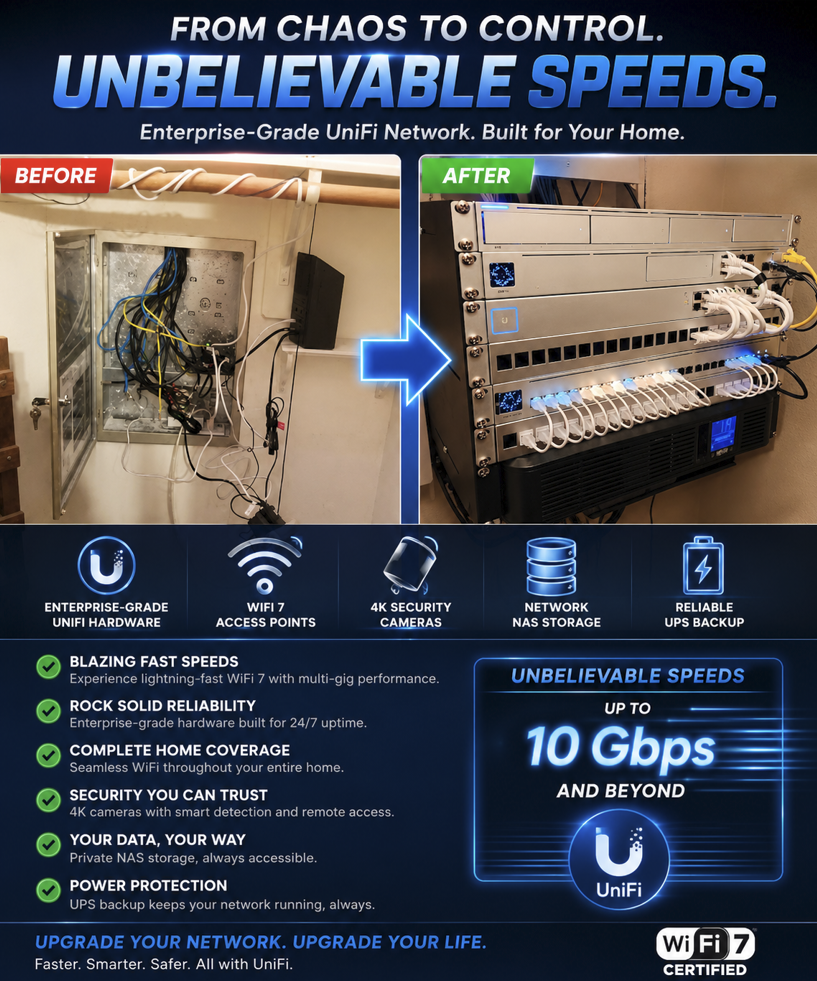
Today's networks need to perform like enterprise networks
— because the demands placed on them have never been greater!
Whether you're managing a connected home or running a small business,
your network has become the backbone of everything you do.
Every video call, security camera, smart device, payment terminal, streaming service,
and cloud application depends on a fast, reliable, and secure connection.
Your network should be able to:
- Handle dozens—or even hundreds—of connected devices without slowing down.
- Deliver reliable Wi-Fi throughout the entire property.
- Support remote work, online learning, video conferencing, and cloud applications.
- Protect sensitive personal and business data from unauthorized access.
- Power smart home devices, security cameras, and automation systems.
- Keep business point-of-sale systems, phones, and operations online with minimal downtime.
- Grow with your needs as the technology changes.
The Truth About Mesh Wi-Fi:
Social media often promotes Mesh Wi-Fi as the solution to every networking challenge.
While mesh systems can improve wireless coverage in certain situations, they don't solve many problems.
In fact, they can create new problems!
A professionally designed network isn't just about stronger Wi-Fi
it's about creating an infrastructure that is reliable, secure, and built to last.
I build my solutions around hardware from Ubiquiti (ui.com)
/ Unifi YouTube channel
This results in robust and managed wired foundation network that includes several access points (AP's).
The Unifi ecosystem also includes a wide range of products to grow what your network can do!
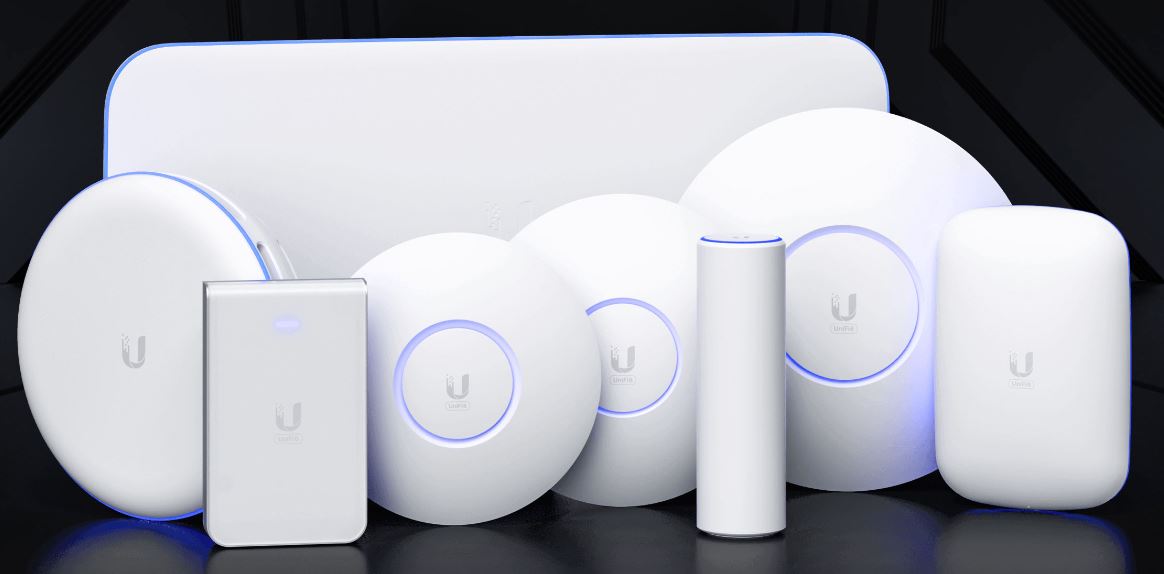
Building great networks starts with personal service.
Then it continues with tiered professional support to fit any budget!
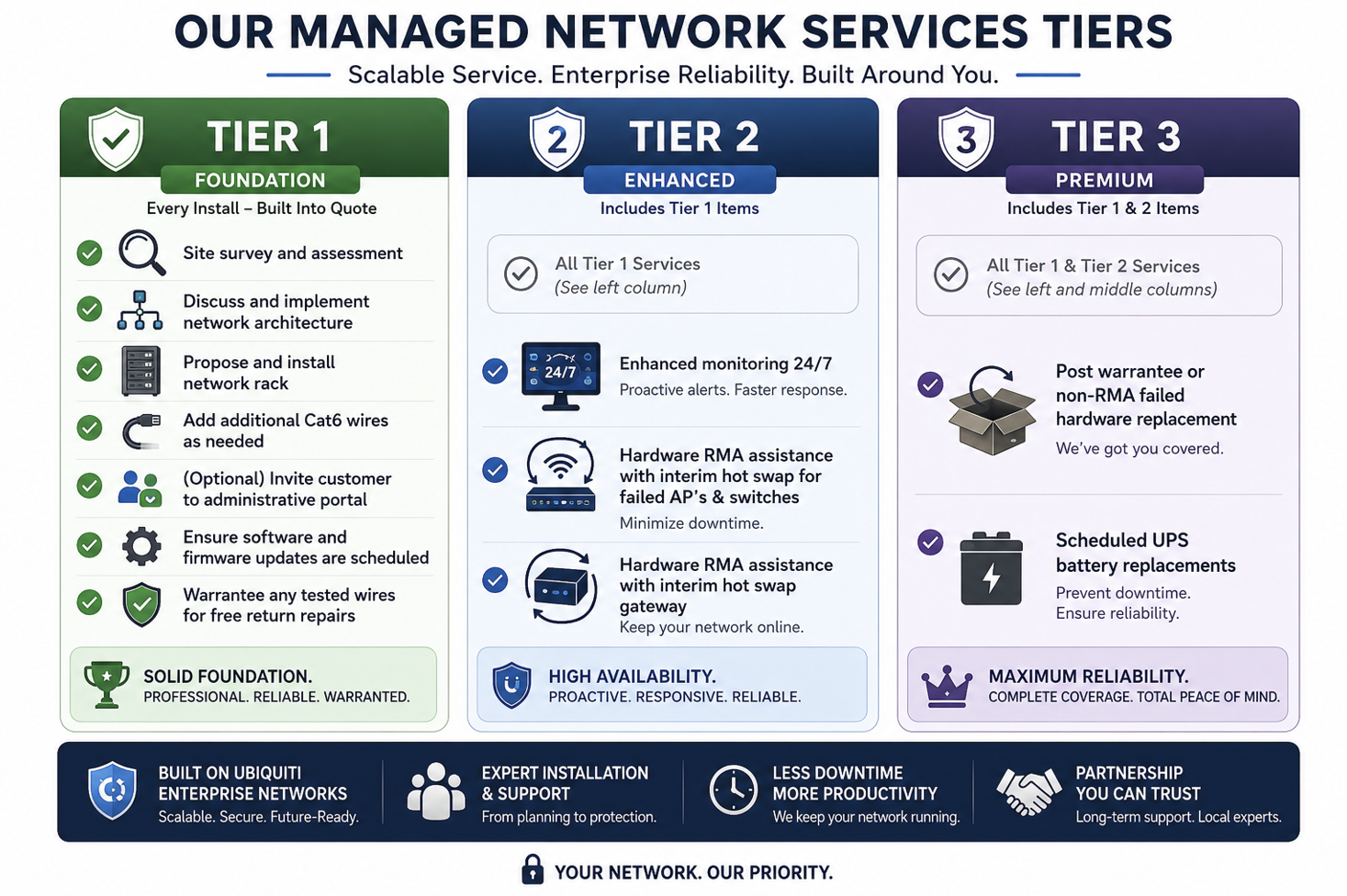
Blomstrom.Tech takes pride in becoming your network MSP partner!
Getting Started
Weak WiFi is usually caused by physical obstructions (walls, metal), interference from other electronics,
being too far from the router, or an outdated router.
The age-old "lazy" advice from ISP's to improve weak signal include:
- Place the router in a central and open location
- Switch to 2.4 GHz for better range
- Add a WiFi extender.
These are all valid ideas, but they are lazy because they attempt to fix the problem without getting involved (using wires).
Additionally, in a large home or office these tactics simply are not enough.
Here are the primary reasons for poor WiFi performance:
- Physical Obstructions: Thick walls (concrete, brick), metal objects, and furniture block WiFi signals.
- Distance/Range: As you move further from the router, the signal strength drops.
- Interference: Other electronics—microwaves, baby monitors, and even neighbor's routers—can interfere with the signal.
- Poor Router Location: Placing the router in a cabinet, on the floor, or in a corner restricts its range.
- Channel Congestion: Too many devices connected at once, or neighbors using the same channel, can cause slow speeds.
Assuming they can actually connect to the weak signal, Wi-Fi range extenders invariably increase latency (ping) and reduce speed
by creating a "double-hop" process, where data is received and retransmitted on the same frequency band.
This added step often causes, at minimum, a 50% reduction in available bandwidth and introduces significant lag,
making them poor choices for gaming or video calls.
Key Latency Impacts of Wi-Fi Extenders:
- Increased Latency (Lag): Extenders double the time it takes for packets to travel from the device to the router,
resulting in higher and more volatile latency (often adding 20ms to over 100ms+ depending on congestion)
- Reduced Throughput: Because most extenders cannot send and receive data simultaneously (half-duplex),
available bandwidth is immediately halved.
- Packet Collisions: Operating on the same channel as the main router, extenders often cause congestion,
leading to packet loss and further latency spikes.
- Ineffective for Real-Time Apps: The added latency makes them unsuitable for gaming, video conferencing,
and other real-time applications
On paper, mesh systems look very promising.
They offer an easy extension of WiFi signals with no ethernet wires.
And, in practice, some folks believe they have good luck with them.
To add to the confusion, ISP providers leave these units behind (like Eero)
because it is quick, easy and cheap for them to leave behind and move on to the next job.
However, these systems are just radios that "talk" to each other.
They suffer from the same limitations as older "extenders" (see above).
This process assumes that the separate units (aka satellites, extenders, or pods) are close enough to each other.
And that is the first flaw.
In our big homes, we want the satelites to be far apart.
This once again makes the signal weak, and results in poor connections.
The second flaw is the specs of radios themselves.
The satelites have to both talk to each other AND to your devices.
So the bandwidth is competing between these functions.
And to make things worse, the radios are not designed to handle heavy loads like true access points.
The more devices you add, the worse the bottleneck becomes.
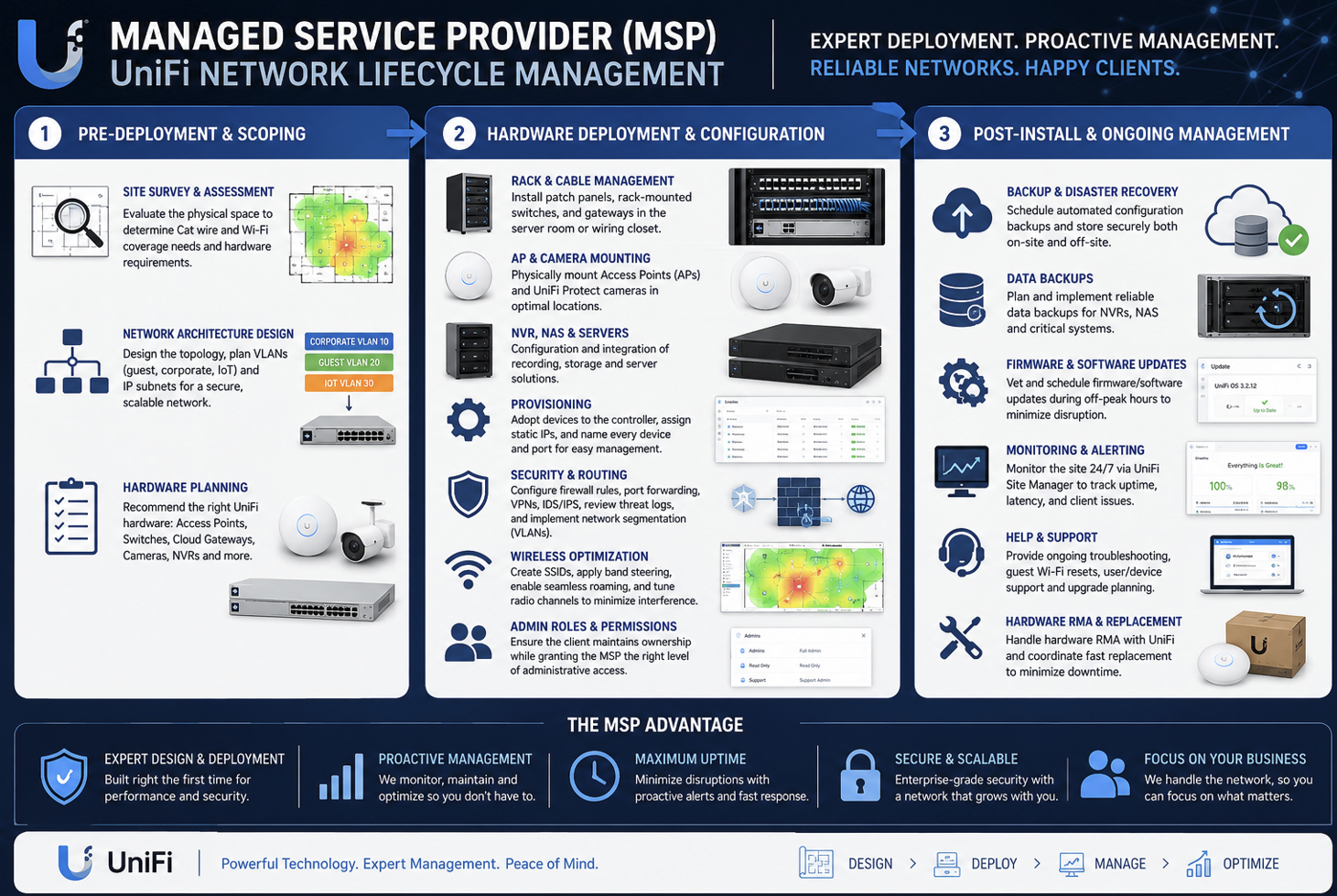
As part of my service as an MSP, the first step to building a solution is to understand the site and your vision.
We offer on-site WiFi/Network assessments to determine cabling options, access point placement, and equipment needs.
We discuss what issues you are having and what your goals are.
This ensures you get the solution that fits your needs.
An MSP is a Managed Service Provider.
Beginning with a site survey we begin a relationship to ensure the best network for the life of the installation.
As we discuss your needs we will define whether you need the standard Tier of service or extended levels.
A more expansive view is here -> MSP Partner tab
Real Solutions
When I architect a solution, there are different tiers to consider.
We live in a world where power and internet may go out, or hardware can fail.
The best resilient networks involve a multi-layered approach.
The most common levels are:
- Level 1 Entry: Choosing a reliable ISP and adding a UPS (battery).
- Level 2 Add redundancy: Add an alternate (Failover) ISP like Cellular or Starlink and improved power.
- Level 3 Fault Tolerant: Add muliple parallel paths of hardware (shadow-mode routers, switches, etc) to prevent interuptions.
To achieve these requirements, I recommend Enterprise Grade Ubiquiti Unifi products.
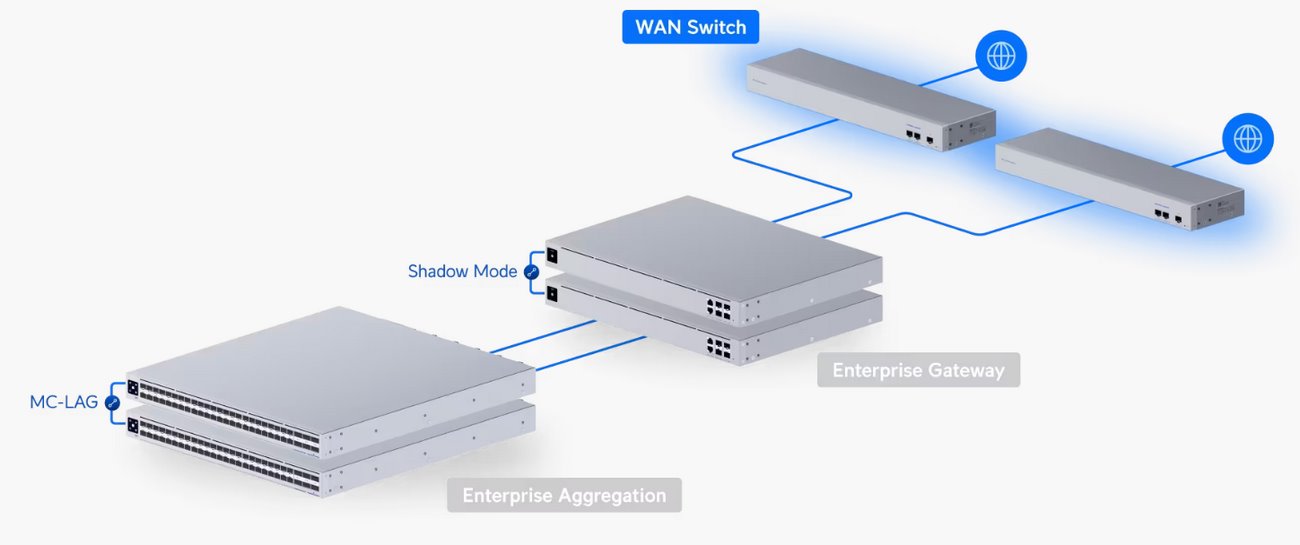
Every system I design begins with us discussing your needs.
I build my network solutions around Ubiquiti Unifi products because:
- Performance: Unifi products offer reliable enterprise level performance and reliability.
- Price: Significantly more affordable than traditional enterprise networking gear from other well known brands.
Estimates have shown UniFi hardware generally costs 20% to 50% less than comparable enterprise models.
- Zero Fees: While typical enterprise vendors charge for hardware plus recurring licensing and support fees, Unifi
uses a no-license fee model, making its long-term Total Cost of Ownership (TOC) a fraction of the cost of its competitors.
- Features: High granularity of network configuration, VLAN capability, and great scalability.
Wired access points (AP's) are superior because they use a physical Ethernet cable backhaul to the router,
providing faster speeds, lower latency, and better reliability compared to wireless mesh systems.
Unlike wireless extenders, wired APs do not divide bandwidth in half, ensuring maximum performance for connected devices.
Key Advantages of Wired Access Points:
- Higher Speed and Reliability: Wired connections offer higher bandwidth and are unaffected by environmental
interference, such as walls or other electronic devices.
- Zero Bandwidth Penalty: Wireless mesh or extenders use up to 50% of their bandwidth talking to the main router;
wired APs use 100% of their capacity for devices, keeping performance consistent and high.
- Lower Latency: They provide lower latency, which is essential for high-performance needs like gaming, video conferencing, and heavy streaming.
- Scalability: Wired systems allow for easy expansion by simply adding more access points to a switch, ensuring consistent performance even in large homes or offices.
- Better Security: Physical connections are harder to intercept than wireless signals, providing better network security.
For the best possible performance, especially for streaming or gaming, a wired connection is always superior,
according to CNET's assessment of Wi-Fi 7 and Ethernet speed tests.
While wireless mesh offers convenience, wired access points are the preferred choice for reliable, enterprise-grade, or professional-grade performance.
Yes. The most popular systems I have installed can utilize speeds up to 10Gbps.
Additionally, Unifi has higher end products that can meet even higher speed needs.
Also, many homes in my area have legacy Cat5 wiring. Becuse these runs are VERY short
in terms of network distances I have been successful at building stable 2.5Gbps wired
runs in cases when a new dedicated Cat6 line is not ideal.
I am excited to be able to offer AP's that deliver WiFi6 and WiFi7 performance!
See my flyer outlining my suggestions for a solid network foundation based on your speed needs:
Fiber Upgrade Flyer
Other Questions
YES!
I have run bundles of backbone cables, building-to-building bridges, multi office/building infrastructure, and cameras systems.
I have upgraded medical-based businesses to be properly secure for HIPPA requirments!
- Separate WiFi networks for staff, administation and guests
- Proper WiFi encryption
- Network segmentation to separate critical data systems from video, a/v, door and guest traffic
- Logging user access
- Ensuring passwords and access are kept "need to know"
Additionally, Unifi is a perfect choice to pair with a POS (Point of Sale) system.
Read my POS article:
July 2026 Blog
Ideally, I would love to discuss the complete ecosystem that Ubiquiti offers.
Today, Ubiquiti has an ever growing ecosytem of products that include:
- Voice (VoIP)
- Door Access
- Digital Signage
- Audio
- E/V Charging
The short answer to this is YES! However, there are several caveats to consider:
- Planning wire runs: It is not always easy to run a line from the central closet to the desired location.
- Holes in walls: Often I need to open up access holes in walls to perform drilling.
- Poor accessibilty: Often attic access is terrible.
These factors equate into labor costs, extra time, and 3rd party wall/paint professionals.
If you are interested, we can discuss during the site assessment beforehand.
In general, I do not troubleshoot or install hardware provided by the customer.
My business is intended to replace other solutions.
When I do an installation I will:
- Configure older Cable Modem "routers" into bridge mode and turn off it's WiFi radios.
- Delete any ISP supplied mesh units and their satellites (like an Eero device).
This is to prevent conflicts on the new network and any "double NAT" conditions.
The exception to this is I will help the customer connect their devices to the new network to the best of my abilty.
I defer engaging:
- Printers: These are often troublesome and refuse to connect.
- Mesh: I will not troubleshoot or add non-Unifi network hardware.
- Alarms: Often the alarm company may need to visit after new network installation to reconfigure their hardware.
- Cameras: Legacy camera systems can present problems if they require special settings to function.
Prior to quote/installation, I will research potential issues to be as transparent as possible.
Even if you own a generator, a network Uninterruptible Power Supply (UPS) is necessary because generators
cannot provide the instantaneous response or consistent power quality required by sensitive networking equipment.
While a generator is a "marathon runner" built for long-term power, a UPS is a "sprinter" that handles the critical first few seconds of an outage.
A network UPS serves three primary functions when paired with a generator:
- Bridging the Startup Gap: Even automatic standby generators typically take 10 to 60 seconds to start up, stabilize, and transfer the load.
Without a UPS, your modem, router, and switches will reboot during this gap, causing a total network
outage that can take several minutes to recover once power is restored.
- Power Conditioning: Generators often produce "dirty" power with inconsistent voltage and frequency.
Sensitive electronics, like servers and high-end routers, can be damaged by these fluctuations.
A UPS acts as a filter, delivering clean, stable AC output to your equipment regardless of the generator's performance.
- Protection Against Flickers: Brief power dips or "flickers" that aren't long enough to trigger a generator can still cause networking
hardware to crash or lose data. A UPS handles these micro-outages seamlessly without cycling your generator.
Support & warranty
- Support: As part of my Tier-1 service, I am available to troubleshoot any issue with the new network for the foreseeable future.
This includes wire/jack failures that I completed and tested at installation.
On multiple occasions, I have helped the change of ownership when a home was sold.
- Warrantees: Unifi hardware has the manufacturer warranty.
As part of my Tier-2 service, I can assist to RMA a faulty unit if that should ever happen.
We can discuss Tier-3 service plans to safeguard against non-RMA failures.